Press Win+W on Windows 11 and you get the Widget Board: weather, stocks, and a news feed I never asked for. The thing I check most often, my OPNsense router, isn’t on it. It lives behind a web UI and a login page. I wanted it on that board instead.
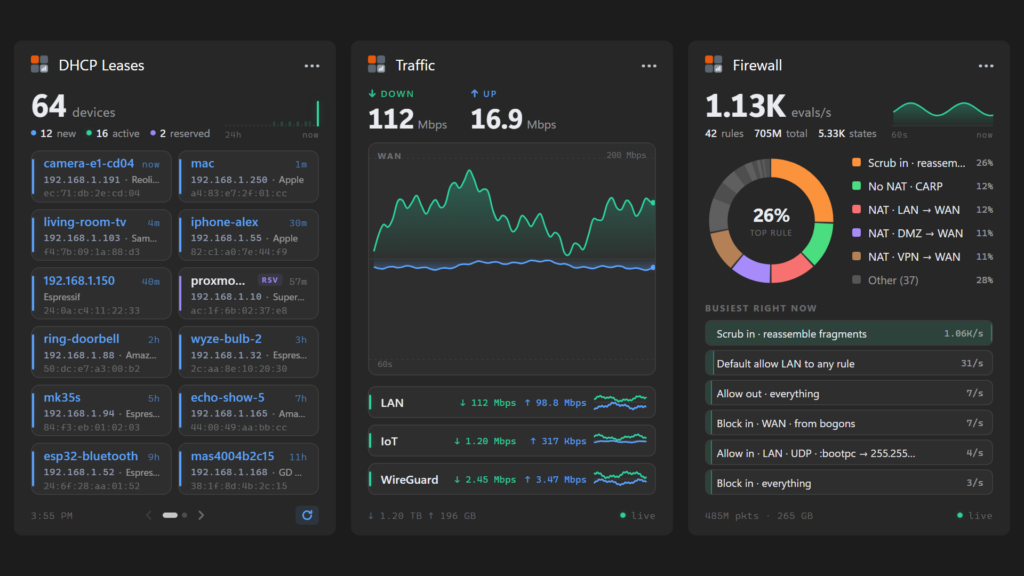
That became Widgets for OPNsense; three widgets for the Windows 11 Widget Board that show your DHCP leases, live traffic and firewall activity, straight from the OPNsense API. The same widgets also run on KDE Plasma 6, and on GNOME as a top bar button. It’s open source and free on the Microsoft Store.
The Problem #
The question I ask my router the most is “what just connected?” A new device shows up, and I want to know if it’s the smart plug I just set up or something I should worry about. Answering that meant opening a browser, logging in to OPNsense, and digging through the DHCP lease page. Same story for “why is the internet slow right now?” or “is that firewall rule even doing anything?”
OPNsense already exposes all of that through its REST API, and the Widget Board is one key press away, so it was mostly a matter of connecting the two.
What the Widgets Do #
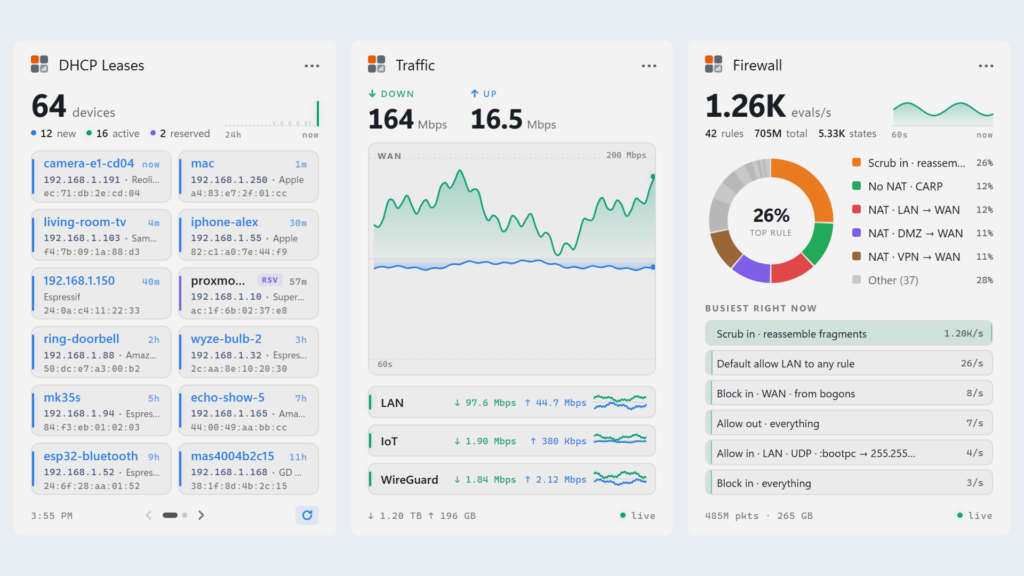
- DHCP Leases: The devices on your network, newest first, with hostname, IP, vendor and how long ago they showed up. New, active and reserved devices each get a color, and a sparkline shows the last 24 hours of activity. It works with ISC DHCP and Kea and figures out which one you run.
- Traffic: Live download and upload for the WAN with a 60-second chart, plus a row per interface for LAN, VLANs and VPNs, and running totals.
- Firewall: Which rules are matching traffic right now, as a donut chart with evaluations per second and a “Busiest right now” list.
- Three sizes: Every widget comes in small, medium and large, and fills the whole canvas at each size. Nothing scrolls; extra devices go in a carousel.
- Quick setup: Enter the router’s address and an API key, or hit Import Key and it reads the key file OPNsense just downloaded. The key is stored in Windows Credential Manager.
- Self-signed certificates: Allowed by default, since nearly every home OPNsense box uses one.
From Adaptive Cards to Web Pages #
The first version, back in April, used Adaptive Cards, the JSON layout format the Widget Board was built around. Cards handle text fine and not much else. They have no charts, so I drew mine with SkiaSharp and shipped them as images. And when content doesn’t fit, the board hides whole elements instead of clipping them. I lost an entire carousel that way before I figured out what was going on.
Windows App SDK 1.8 lets a widget show a web page instead, so in October I rebuilt all three widgets as HTML pages. The app serves them itself. Each widget points at a made-up origin, https://opnsense-widget.test, and the package manifest routes every request for it back into the widget provider. The app polls the router and sends fresh data to the page as messages.
There’s very little documentation for this part of the platform, so most of what I know came from testing on my own board:
- The stream type matters: Hand the board a .NET
MemoryStreamwrapped as a WinRT stream and you get “There was an error loading.” It only works with a nativeInMemoryRandomAccessStream. - Don’t talk during callbacks: Sending a message to the page from inside one of the board’s callbacks deadlocks the whole Widget Service. I tracked that one down with
dotnet-dump, and the stack trace pointed right at it. Messages now go out on a background task, and only after the page says it’s ready. - Pages forget everything: The board reloads every page each time you open it. Traffic history, firewall rates and when each device was first seen all live in the app, and the page just draws them.
I kept the Adaptive Cards as a fallback. Microsoft documents web content widgets as limited to some regions, and the cards cover any board that can’t show a page.
Making Router Data Human #
This is where things got interesting. Some of what the API returns doesn’t mean what it looks like.
Kea, the newer DHCP server in OPNsense, doesn’t tell you when a device joined. The lease start it reports is the last renewal, so every device looks new every few hours. The widget keeps its own record of when it first saw each MAC address, and that’s what “new” means. Kea leases also don’t say whether they’re reserved, so that comes from a separate reservations endpoint, matched by MAC or IP.
The firewall was worse. Rules without a description come back as raw pf text, with device names like vmx0 where you’d expect WAN. The widget rewrites those into something readable, like “NAT · LAN → WAN”, and merges rules that end up reading the same. It can’t do anything about the scrub rule that reassembles fragments, though. That rule matches every single packet, so it tops “Busiest right now” every time. It’s the hardest working rule on my network, and the least interesting.
Same Widgets on Linux #
Once the widgets were web pages, very little tied them to Windows. I moved the widget logic into a plain net8.0 library and gave each OS a small host on top of it:
- KDE Plasma 6: A user service,
opnsense-widgetsd, polls the router and serves the same pages on127.0.0.1. Each Plasma widget shows its page in an embedded browser and talks to the service over a WebSocket. The service only answers on loopback and checks the Host and Origin headers, so a random web page can’t read your lease list through it. - GNOME: GNOME Shell can’t show web pages at all, so the extension draws everything natively from the same data. You get a top bar button with the device count or WAN speed, a menu with the newest devices, traffic and the busiest rules, and a notification when a device joins for the first time.
Asking Before Naming It #
OPNsense is a registered trademark of Deciso B.V., and their guidelines ask for permission before a derivative project uses the name. So I asked. They said yes with two conditions: call it “Widgets for OPNsense” rather than “OPNsense Widgets”, and say clearly that it isn’t affiliated with them. I also replaced their logo in the icons with my own four squares, so nobody mistakes it for an official app.
Lessons Learned #
Test on the real thing: The docs barely cover web content widgets. Every rule in my notes came from a redeploy and a log file.
Don’t invent data: The widgets only poll while the board is open, so the history has gaps. The charts break the line at a gap instead of drawing a smooth guess across it.
Write the core once: Moving the logic out of the Windows provider is why Plasma and GNOME didn’t need a rewrite.
End Result #
The first version took about a week in April. The rewrite to web pages, both Linux ports and the Store submission took about another week at the end of October, for around 9,000 lines of C#, JavaScript, HTML, QML and shell, with Claude Code as my pair programmer the whole way. Now “what just connected?” is a Win+W away.
Next on the list are more widgets, like WAN status and system info, and maybe macOS, where I’m sure WidgetKit will be thrilled to load a web page from a made-up domain.
Links #
Widgets for OPNsense is open source under the MIT license and available on GitHub. If your router returns something the widgets don’t understand, issues and PRs are open. OPNsense® is a registered trademark of Deciso B.V. This project is not affiliated with or endorsed by Deciso B.V. or the OPNsense project; the name is used with their permission.
Discover more from The Maker Shed
Subscribe to get the latest posts sent to your email.